

Description
Download MigrateEmails PST to Office 365 Migration Tool – Secure, Fast & Reliable Email Migration Software
MigrateEmails PST to Office 365 Migration Tool is a powerful, full-featured software designed for Windows users who need to migrate email data from PST files to Microsoft Office 365 with precision and ease. This secure migration tool streamlines the process of transferring Outlook emails, contacts, calendars, and attachments to the cloud, ensuring no data loss during the transition. Ideal for businesses and individuals managing large volumes of archived emails, the software supports batch processing, selective migration, and real-time progress tracking. With its intuitive interface and robust performance, MigrateEmails delivers a hassle-free experience for users seeking a reliable solution to modernize their email infrastructure.
Why Choose MigrateEmails for PST to Office 365 Migration?
When transitioning from legacy email systems to the cloud, choosing the right migration tool is crucial. MigrateEmails PST to Office 365 Migration Tool stands out as a top-tier solution for users who demand both efficiency and security. Unlike generic file transfer tools, this software is specifically engineered to handle the complexities of PST files—commonly used by Microsoft Outlook for storing email data. The tool supports both single and bulk PST file migration, allowing users to move entire email archives or specific folders with ease.
One of the standout features is its ability to preserve folder hierarchy, metadata, and timestamps during migration. This ensures that your email organization remains intact, making it easier for users to locate important messages after the move. The software also supports password-protected PST files, which is a critical feature for enterprises with sensitive data. With built-in validation checks, MigrateEmails verifies the integrity of each migrated item, reducing the risk of data corruption or loss.
Another major advantage is its compatibility with various versions of Outlook and Office 365, including Exchange Online. Whether you're migrating from Outlook 2007 to the latest cloud-based service, MigrateEmails handles the conversion seamlessly. The tool also offers a preview mode, allowing users to inspect the contents of their PST files before migration. This transparency builds trust and helps prevent errors. For IT administrators managing multiple user accounts, the batch migration feature is a game-changer—saving hours of manual work. With secure authentication and encrypted data transfer, MigrateEmails ensures your sensitive email data remains protected throughout the process.
Key Features & Capabilities of MigrateEmails PST to Office 365 Tool
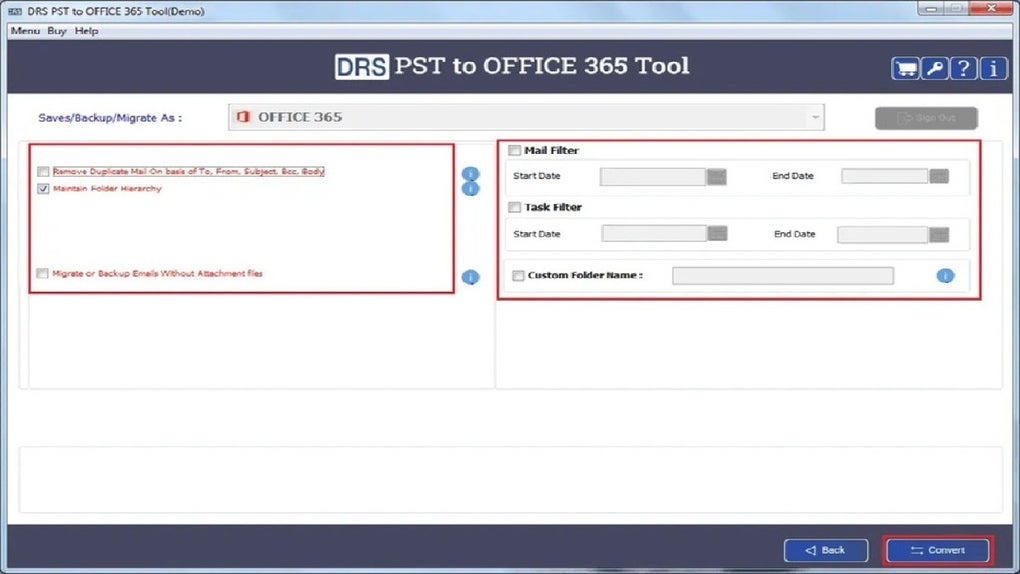
MigrateEmails PST to Office 365 Migration Tool is packed with features designed to simplify and enhance the email migration experience. One of the most valuable features is its selective migration capability, which allows users to choose specific folders, emails, or date ranges for transfer. This is particularly useful when you only need to migrate recent or critical communications, reducing migration time and cloud storage usage.
The software also includes batch processing, enabling the simultaneous migration of multiple PST files. This is ideal for organizations undergoing large-scale migrations, such as when switching to Office 365 across departments. Each file is processed independently, with real-time progress tracking and detailed logs available for auditing purposes. These logs can be exported for compliance and record-keeping, a must-have for regulated industries like healthcare and finance.
For users concerned about data security, MigrateEmails offers end-to-end encryption during transfer and supports OAuth 2.0 authentication for secure access to Office 365 accounts. The tool also provides a preview function that lets you browse PST contents before committing to migration, ensuring accuracy and preventing unwanted data transfer. Additionally, it supports incremental updates, meaning you can run the tool again after the initial migration to sync any new emails or changes—perfect for ongoing data management.
Other notable features include automatic PST file detection, error recovery, and customizable mapping of mailboxes. The user interface is clean and intuitive, making it accessible even for non-technical users. Whether you're a small business owner or a corporate IT team, MigrateEmails adapts to your workflow with minimal setup required. The software is also lightweight, consuming minimal system resources, which ensures smooth performance even on older Windows machines.
How to Install and Use MigrateEmails for Seamless Migration
Getting started with MigrateEmails PST to Office 365 Migration Tool is straightforward and requires no technical expertise. Begin by downloading the software from the official website. The installer is a small, self-contained executable file that runs quickly on Windows systems. Once downloaded, run the installer and follow the on-screen prompts. The setup process takes less than two minutes and doesn’t require rebooting your machine.
After installation, launch the application. The main dashboard displays a clean, organized interface with clear navigation. Click on “Add PST File” to browse and select your Outlook data file. If your PST is password-protected, enter the password when prompted. The tool will scan the file and display a tree view of all folders and subfolders, allowing you to preview the content.
Next, configure your Office 365 account by entering your email address and authenticating via OAuth 2.0. This secure method eliminates the need to store credentials on your device. Once authenticated, select the target mailbox and choose whether to migrate all data or specific folders. You can also set filters based on date, sender, or subject for precise control.
Finally, click “Start Migration” to begin the process. The tool provides real-time progress updates, estimated completion time, and a success/failure summary. After migration, you can verify the results by logging into your Office 365 account and checking the inbox, calendar, and contacts. For future updates, simply run the tool again to sync new data—no need to restart the entire process.
Compatibility, System Requirements & Support
MigrateEmails PST to Office 365 Migration Tool is exclusively designed for Windows operating systems, including Windows 10, Windows 11, and Windows Server editions. It is not available for Mac, Android, or iOS devices, so users on non-Windows platforms will need alternative solutions. The software is compatible with all major versions of Microsoft Outlook (2007–2024) and supports both ANSI and UNICODE PST formats.
System requirements are modest: a minimum of 2 GB RAM, 500 MB of free disk space, and a stable internet connection. The tool runs on both 32-bit and 64-bit Windows systems. It does not require administrative privileges for basic operations, although some advanced features may need elevated access.
Customer support is available via email and a comprehensive knowledge base with step-by-step guides and troubleshooting tips. The developers regularly release software updates to improve performance, fix bugs, and enhance compatibility with new Office 365 features. Users are encouraged to keep their version up to date for optimal results and security.
Pros & Cons of MigrateEmails PST to Office 365 Tool
- Pros:
- Secure, encrypted migration with OAuth 2.0 authentication
- Supports selective and batch migration of PST files
- Preserves folder structure, metadata, and timestamps
- Intuitive interface suitable for beginners and experts
- Real-time progress tracking and detailed logs
- Supports password-protected and corrupted PST files
- Regular updates and reliable technical support
- Cons:
- Windows-only software (no Mac, Android, or iOS support)
- No built-in cloud backup option for PST files
- Advanced features require a paid license (free trial available)
Frequently Asked Questions (FAQ)
Is MigrateEmails PST to Office 365 Tool free to download?
Yes, MigrateEmails offers a free trial version that allows you to test the core migration features. However, full functionality, including batch processing and advanced settings, requires a paid license. The free version is ideal for evaluating the tool before purchasing.
Can I migrate password-protected PST files?
Absolutely. MigrateEmails supports password-protected PST files. Simply enter the correct password during the migration setup, and the tool will process the file securely.
Does the tool support incremental updates?
Yes, MigrateEmails allows incremental migration. After the initial transfer, you can run the tool again to sync any new emails or changes, ensuring your Office 365 mailbox stays up to date.
Is my data secure during migration?
Yes, MigrateEmails uses end-to-end encryption and OAuth 2.0 authentication to ensure your data remains secure. No credentials are stored locally, and all transfers are encrypted in transit.
Can I use this tool on Mac or mobile devices?
Currently, MigrateEmails is only available for Windows. There is no native version for Mac, Android, or iOS. Users on other platforms may need to use virtual machines or alternative tools.
Final Verdict: A Must-Have Tool for Office 365 Migration
If you're managing a transition from Outlook PST files to Office 365, MigrateEmails PST to Office 365 Migration Tool is one of the most reliable, secure, and user-friendly options available. Its powerful features, intuitive design, and strong security protocols make it a top choice for both individual users and enterprise teams. Whether you're migrating a few personal emails or an entire organization’s archive, this software delivers fast, accurate, and stress-free results.
With regular updates, excellent support, and a proven track record, MigrateEmails stands out as a trusted partner in your digital transformation journey. Don’t risk data loss or manual errors—download the free trial today and experience seamless migration with confidence.
Download MigrateEmails PST to Office 365 Migration Tool now and modernize your email storage with ease.
Guides & Tutorials for MigrateEmails PST to Office 365 Migration Tool
How to install MigrateEmails PST to Office 365 Migration Tool
- Click the Preview / Download button above.
- Once redirected, accept the terms and click Install.
- Wait for the MigrateEmails PST to Office 365 Migration Tool download to finish on your device.
How to use MigrateEmails PST to Office 365 Migration Tool
This software is primarily used for its core features described above. Open the app after installation to explore its capabilities.
User Reviews for MigrateEmails PST to Office 365 Migration Tool 0
No reviews found





